Smart Job Import
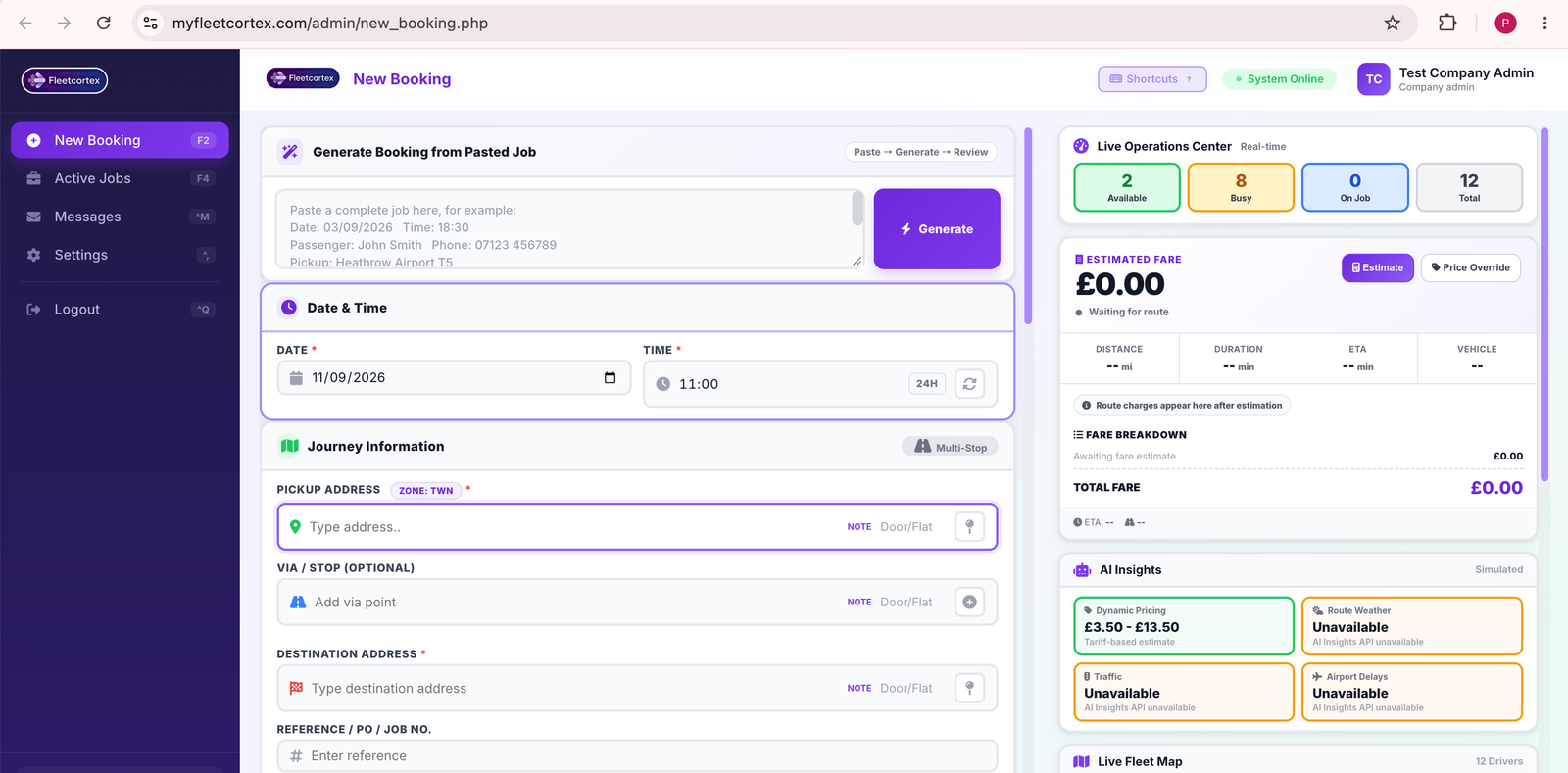
Paste a whole job description from WhatsApp, email, or a call transcript — FleetCortex extracts date, time, passenger name, phone, pickup, via, dropoff, vehicle type, passenger count, luggage, and flight number, and fills the entire form automatically.
- One-paste parsing — supports labelled dispatch text
- Smart address resolution — resolves pickup, via and dropoff as UK addresses
- Auto time detection — recognises 24h & 12h time formats
- Fallback recognition — extracts phone, email, date and time even from unlabelled text
Date & Time Control
Set the booking date and a 24-hour pickup time. One-click "Set now" uses the exact current time, and the input auto-formats digits as you type.
- Auto-format 24h time entry
- Live clock, one-click current time
- Fully editable for advance bookings
Multi-Stop Journey
Build a journey with pickup, optional via/stop, and destination. Every address supports a door/flat note and can be pinned directly on the live fleet map.
- Pickup + Via + Destination
- Door / Flat notes per stop
- Pin button centres the map on any address
- Free-text reference / PO / job number
Passenger Records
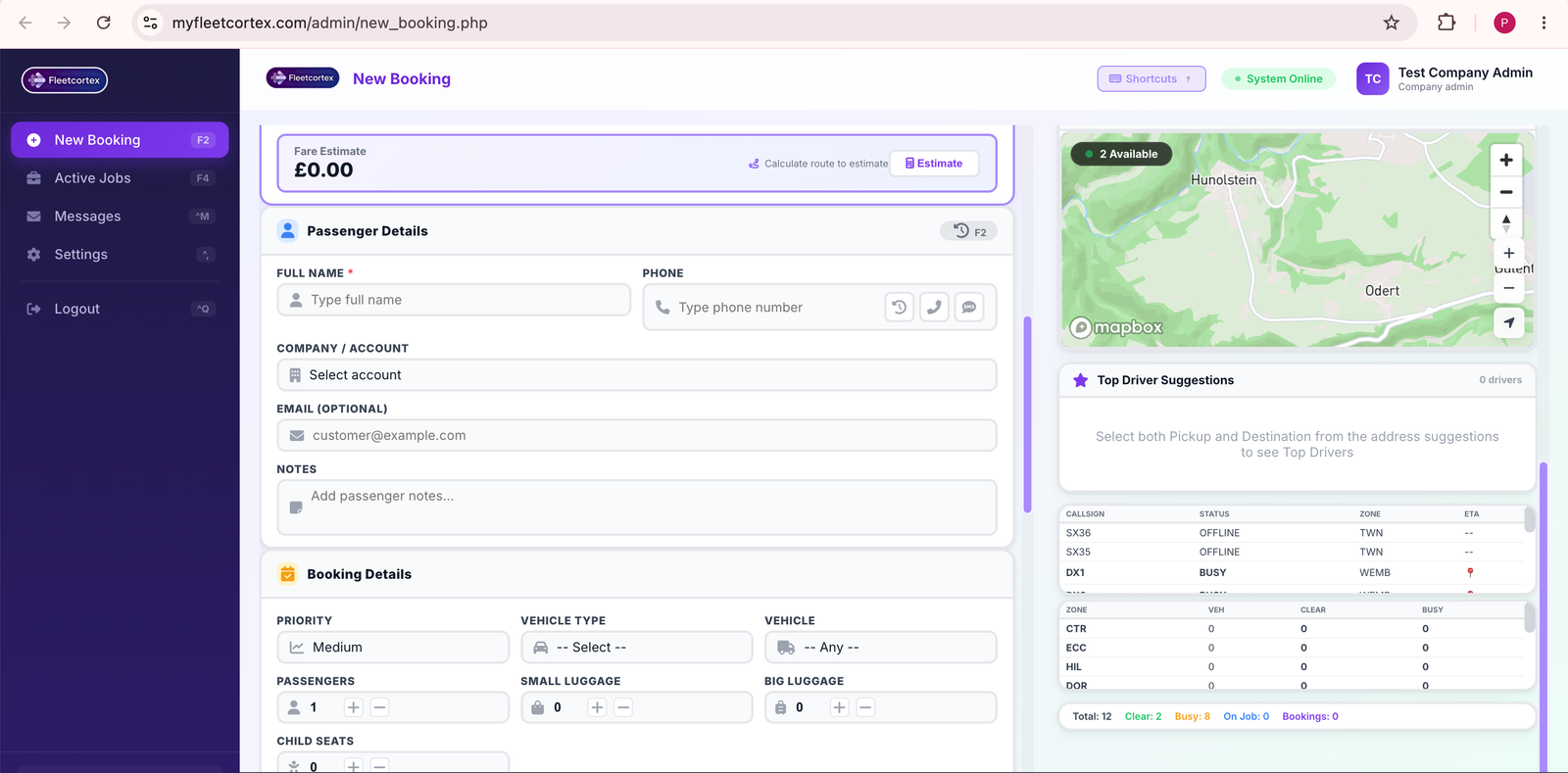
Capture the full name, phone, email, account and notes. Press F2 to load the entire booking history, active jobs, favourites, call log and change history for that phone number.
- Name, phone, email, account, notes
- F2 → full passenger history panel
- Quick call & SMS buttons
- Account lookup for corporate customers
Booking Details
Choose priority (Low / Medium / High / Emergency), vehicle type, and the exact vehicle. Passenger count and luggage capacity are automatically validated against the vehicle type you select.
- Priority levels: Low → Emergency
- Vehicle type & specific vehicle selection
- Passengers, small & big luggage steppers
- Child seats and passenger notes
- Live capacity guard — blocks impossible loads
Special Requirements
A collapsible panel of nine capability chips plus a free-text requirements field, so every accessible, corporate, or pet-friendly booking is captured cleanly.
- ♿ Wheelchair access
- 👶 Child seat
- 🐾 Pet friendly
- 🧳 XL luggage
- ✈️ Airport meet & greet
- 🏢 Corporate account
- 👩 Female driver preference
- ✅ DBS-checked driver
- 🌍 Multilingual driver
- Free-text additional requirements
Driver Assignment
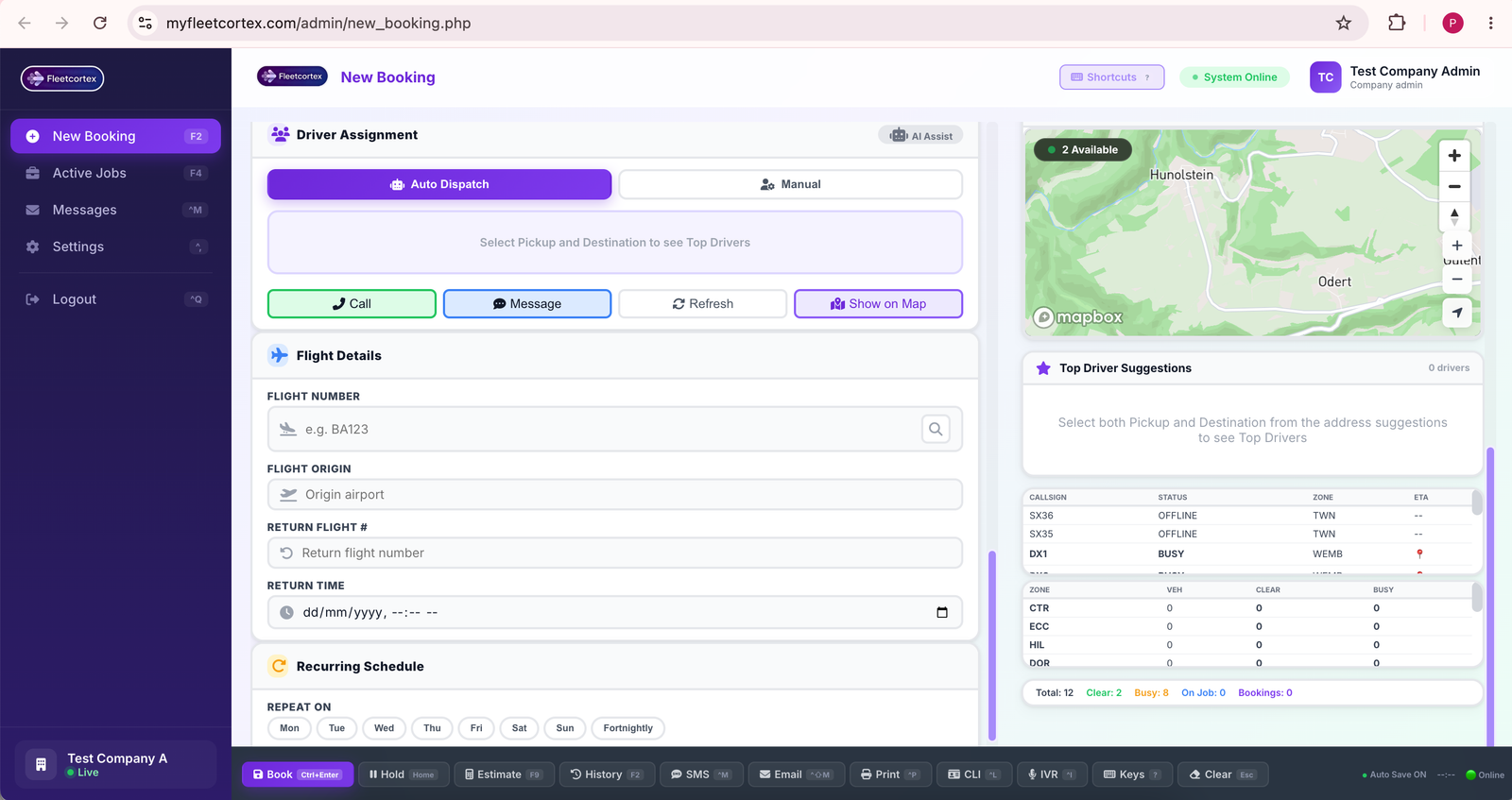
Toggle between AI Auto-Dispatch and full Manual control. Auto mode picks the nearest compatible driver; Manual mode gives you a searchable driver picker with live status.
- AI auto-dispatch by GPS proximity
- Manual search by name / callsign
- Live status: Available · Busy · On Job · Offline
- One-tap Call, Message, Refresh, Show on Map
Flight Tracking
Store flight number, origin airport, return flight and return time. The one-click flight status check gives live arrival information for airport pickups.
- Arrival flight number & origin airport
- Return flight + return time
- Live status lookup
Recurring Schedule
Turn any booking into a repeating job with day-of-week toggles, an optional fortnightly pattern, and a repeat end date.
- Mon – Sun day toggles
- Fortnightly option
- Repeat end date
- Free-text company field
Authoritative Fare & Live Route Charges
One click calculates the true driving route — including any via stop — and returns an authoritative fare from your company's own tariff: base hire, mileage, minimum fare, airport surcharge, night and peak surcharges, congestion charges, plus tunnel and bridge route charges.
- Real road route via Mapbox Directions (pickup → via → dropoff)
- Distance & duration in miles and minutes, with ETA
- Zone detection — authoritative zone returned by the server
- Airport surcharge applied automatically for airport pickups/drop-offs
- Congestion, night & peak charges shown as separate line items
- Tunnel & bridge charges — Dartford, Blackwall, Mersey, Tyne, Forth and more
- Price override with percentage quick-adjust and reset
- Manual override flag so dispatch always knows a price was changed
AI Insights Panel
Live route intelligence for the booking, updated as soon as you pick pickup and destination.
- Route weather
- Traffic level & travel time
- Airport disruption monitoring
- Dynamic pricing range
Live Fleet Map
The main console map shows every active driver with callsign and status colour, plus pickup, via and dropoff markers you can drag to fine-tune any address.
- Live driver markers by status
- Draggable pickup / via / dropoff
- Zoom, recenter, fit-route controls
Top Driver Suggestions
As soon as pickup and destination are set, the console ranks the closest compatible drivers by real road ETA — not straight-line distance.
- Ranked by real driving time
- Vehicle & capability compatibility filter
- Driver intelligence popup with full route view
- Approach ETA, journey ETA, journey timeline
- Call, SMS, assign — right from the popup
Live Operations Center
The right rail always shows how the fleet is doing right now, so you never dispatch into an empty zone blind.
- Available / Busy / On Job / Total counters
- Per-zone clear vs busy driver table
- Driver queue table with status
- Auto-refresh every 15 seconds
Keyboard-First Dispatch
Built for call-centre operators who live on the keyboard. Every common action has a shortcut — including F2, F9, Ctrl+Enter, Insert, Home and End.
- F2 passenger history · F9 estimate
- Ctrl+Enter review · Home save as Hold
- Insert price override · Alt+A add via
- Ctrl+P call passenger · Ctrl+D call driver
Journey Review & Confirmation
Before the booking is saved, FleetCortex presents a full review screen so the operator can read the details back to the passenger. Confirm, edit, or cancel — without losing any data.
- Full recap: passenger, schedule, journey, vehicle, driver, fare
- Weather and AI insights summary included
- Keyboard confirm (Enter) · edit (E) · cancel (C)
- Save as Hold for a later dispatch
- Automatic booking reference generation